
Keyword research is the first and most important step of every successful search campaign in digital marketing, whether it is organic Search Engine Optimization (SEO) or paid Pay-Per-Click (PPC) ads. It closes the gap between what you offer your clients and what your clients really need. What is your target audience searching for on search engines? The best source of search demand data is Google Keyword Planner (GKP), but third-party keyword tools often require software subscriptions that cost hundreds of dollars a month.
As a freelance digital marketer, learning how to use Google Keyword Planner Tool allows you to make pitch decks, technical plans, and ad budgets using Google’s own first-party data while minimizing client overhead. This ultimate guide will show you how to use Google Keyword Planner for the best results for your PPC & SEO client campaigns.
1.Setting Up Google Keyword Planner (Without Spending Money)
Google Keyword Planner tool within the Google Ads platform. You don’t need to be running a current ad spend to use the service, but Google asks customers to set up a paid campaign and provide payment information when they sign up.
The Free Access Setup Process:
1.Sign in to your Google Account and open Google Ads.
2.When you are prompted to create a campaign, choose Switch to Expert Mode.
3. Choose the option to “Create an account without a campaign.
4. Please check your company information and then go to the top menu bar.
5.Go to Planning, and click Tools & Settings > Keyword Planner.
Freelancers can use the Google Keyword Planner Tool to check expected search volumes and explore keyword options, making it easier to plan content around relevant search terms.
Once you’re in there, there are two main access points: Discover New Keywords and Get Search Volume and Forecasts.
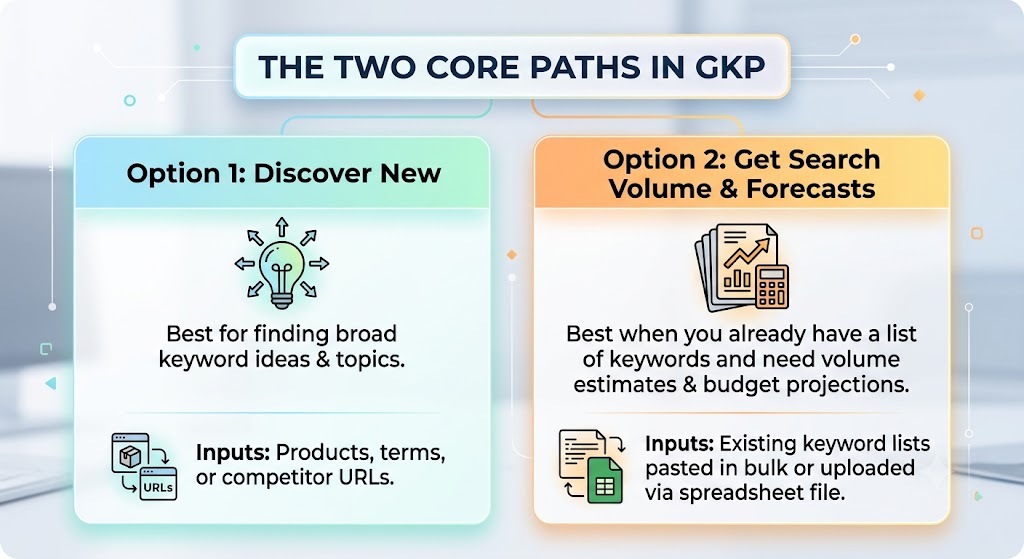
2.Uncovering High-Intent Keyword Opportunities
It’s not just high-volume terms that you want to focus on, but rather the right terms with clear search or commercial intent.
Steal Competitor Keyword Strategies
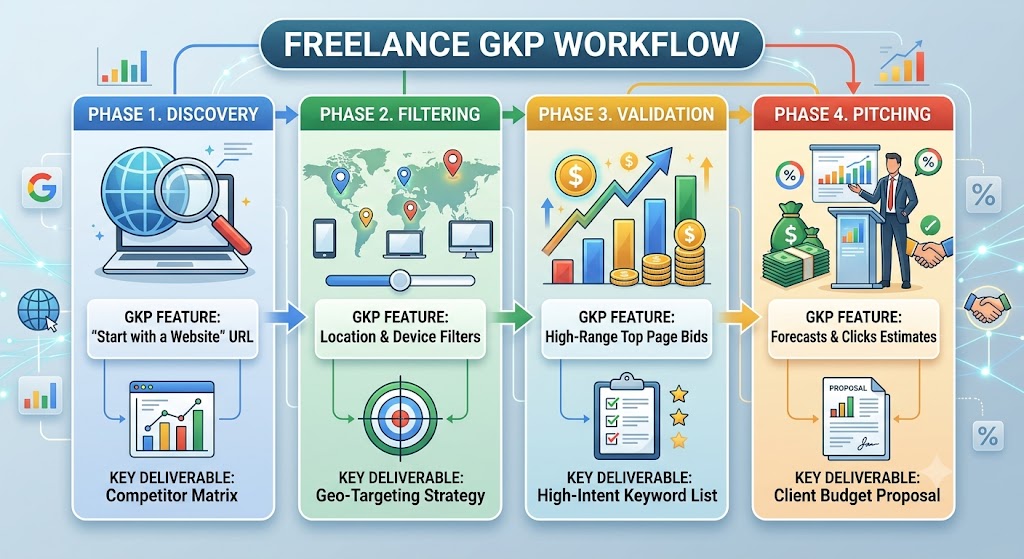
One of the best features of Google Keyword Planner is the “Start with a Website” filter. Instead of guessing at seed keywords, enter a prospective customer’s competitor URL into the Google Keyword Planner Tool . GKP will crawl the domain or landing page to locate the exact terms Google associates with that competitor’s product lines.
Understand Commercial Intent with Bid Data
GKPs Competition column indicates advertizer competition for ad placement. Look at the bid metrics for business interest:
- Top of Page Bid (Low Range):The lowest amount that advertisers are obligated to pay to be able to show up at the top of the search results.
- Top of Page Bid (High Range):The amount that top advertisers pay to ensure they are in the position.
- A keyword is a term to focus on in both SEO content and paid ad groups if it has a high bid range, which means that businesses earn a lot of money from that kind of traffic
3.Advanced Hacks for Digital Marketing Freelancers
GKP is simple, but the experienced independent contractors have all kinds of clever workarounds to ferret out more detail:
Hack 1: Unlocking Narrower Search Volume Estimates
On Google, inactive accounts will display a range of search volumes, like 1K-10K or 10K-100K. They’re not buying ads on these accounts. You can fix that on the Forecasts tab. Do this after adding your keywords to a plan in GKP. Move the max bid (CPC) slider to some money. Google shows estimated impressions for each month. The actual monthly search volume is the number of impressions you see. The Google Keyword Planner Tool is a great tool that helps you choose themes for your website. It gives you relevant keyword data, as well as estimated ranges of search traffic.
Hack 2: Geo-Targeted Hyper-Local Research
when the bid is high enough to get the potential clicks Third‑party tools give only national search volume data. National volume does not help if you run pay‑per‑click or local search engine optimization for clients like local contractors, dentists, or attorneys. You can use GKP to narrow search volume to states, cities, metro regions, or postal codes. Thus, local business clients get accurate predictions about demand in their local market. The Google Keyword Planner Tool allows you to filter your keyword research by language and location to get suggestions that are more relevant to local customers.
Hack 3: Mobile vs. Desktop Device Splits
The Google Keyword Planner Tool will help freelancers to understand the keyword search patterns and create successful digital marketing strategies. If you go to the Forecasts tab and then choose the Device breakdown option, you will see how many searches are coming from devices vs. desktop computers. If 85% of searches for your target term are being done on devices, it’s a strong indication that your client needs to be working on improving mobile page speed. They should also ensure that the menu is easy to navigate on screens and that forms on landing pages are thumb-friendly. This helps to keep users from bouncing off of your site too early.
4.Converting Keyword Data into Client Winning Proposals
Data alone will not keep clients on retainer. Everything is your data presentation. Use Google Keyword Planner Tool to create a short, revenue-focused proposal before giving it to a potential client:
1.Highlight Low-Hanging Fruit: Easily achievable goals for SEO or PPC testing If you want quick wins with SEO or PPC testing, look for keywords relevant to your business that have low competition for ads and high search volume.
2.Project Paid Search Budgets: Project Paid Search Budgets: Before launching campaigns, show potential clients the projected clicks, impressions, and anticipated ad spend on GKP’s Forecasts page.
3.Map Out Content Hubs: Create Content Hubs Group GKP keyword suggestions into semantic clusters or ad groups. Provide the client with a three- or six-month content roadmap that includes these clusters.
Final Thoughts
Google Keyword Planner Tool is still one of the most important tools in a freelancer’s digital marketing toolbox. GKP provides direct data from Google’s search ecosystem, but third-party paid platforms are more convenient. Bid analysis for intent verification, hyper-local geographic filtering, and keyword extraction from websites allows you to build data-driven client strategies with a high return on investment.